MARKETING & PROMOTION
How to Segment Your Email List as a Musician

Nida

Oct 20, 2026
If your mailing list includes fans in different cities, you can send show reminders to people in the cities you're playing. You can also send an early merch offer to subscribers who've bought from you before.
This guide shows you how to group fans by city, past purchases or the updates they want. It also explains how to check who will receive an email and avoid sending it twice.
TL;DR
-
Decide what you're announcing, then choose who to email.
-
For a local show, select the city and any nearby cities you want to include.
-
If your website's store and mailing list are connected, use orders to find subscribed buyers.
-
Make groups for updates fans have asked for, such as news about a vinyl repress.
-
Check who will receive each email. A new song can still go to your whole list.
Table of contents
What is email segmentation for musicians?
Email segmentation means grouping subscribers so you can choose who gets each email. You could send show news to fans in one city, or a merch offer to people who've bought from you. General updates, such as a new song, can still go to your whole list.
If you're collecting your first subscribers, start with the guide to building an email list as a musician. This post is about choosing who to email once people have joined.
Start with the email you want to send
Start with what you're announcing and who would want to hear about it. For a show reminder, check subscribers' cities. For an offer to past merch buyers, check their purchases.
Open your mailing list and check whether you have those details. If they're missing, ask fans or check your orders before making the group.
When you email past buyers, choose the ones who've agreed to receive your newsletters. Google's email sender guidelines recommend sending newsletters to people who want them.
Use location for show announcements
For a Manchester show, choose subscribers with Manchester saved as their city. Think about where else people might travel from, taking the venue and transport into account.
Add nearby cities separately if you want to include them. Choosing Manchester won't automatically include the surrounding area. Choosing the UK includes subscribers across the country.
Use the city a subscriber has shared with you. If someone joined your list at a show, they may have travelled from somewhere else. People also move, so ask for updated cities when you need them.
Fans with no city saved won't be included when you select a city.
For help booking and promoting the dates themselves, see the DIY tour guide.
Get our new guides by email

Use buying history for music and merch offers
Someone who bought a shirt may want an early look at your next design. A subscriber who bought a digital EP may be interested in the new album. Buyer groups help you find those people on your list.
Check which purchases each group includes. The music-buyer group pictured below covers digital albums and tracks. CDs and vinyl sold through the store count as merch.
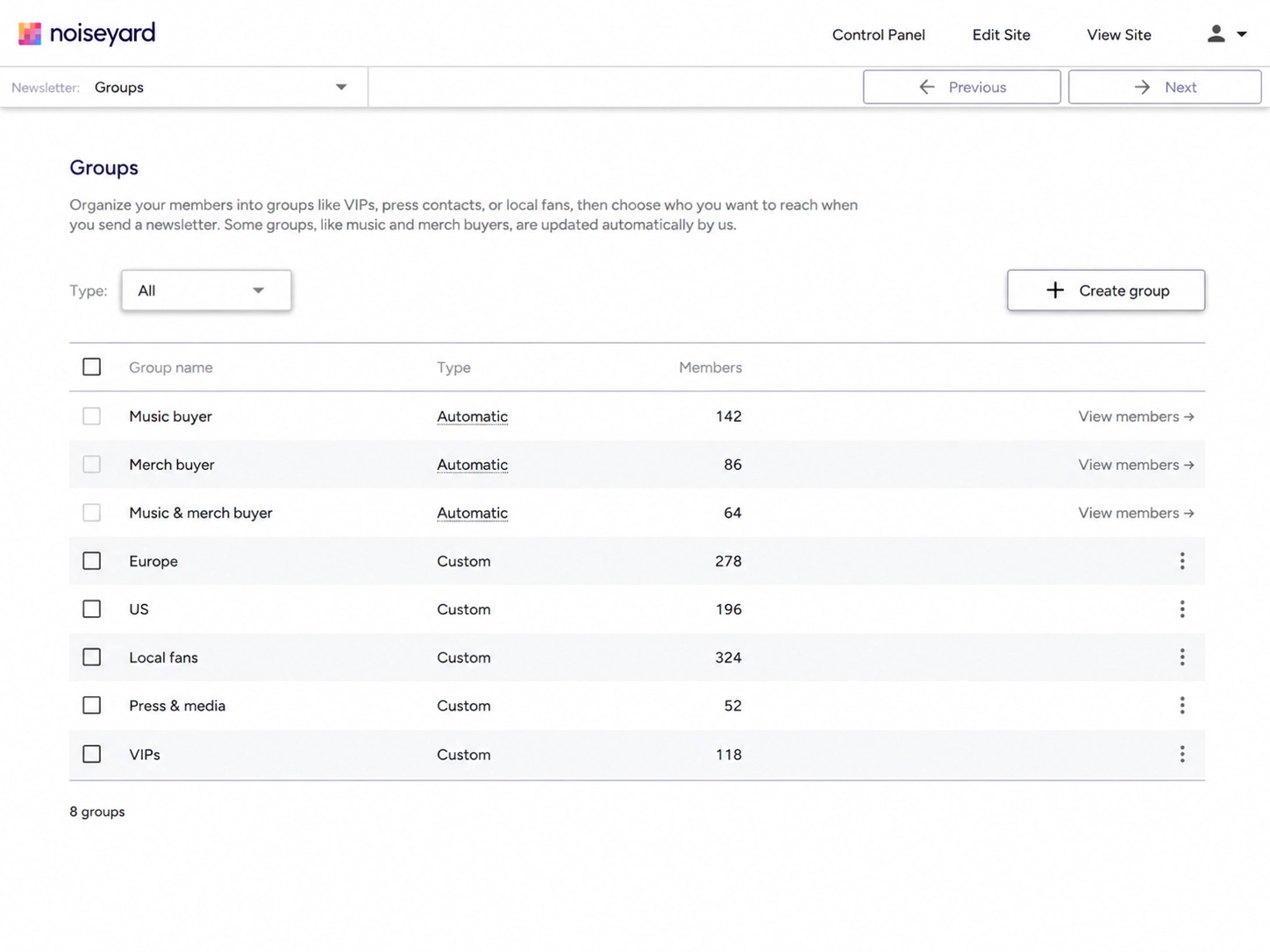
These groups include purchases from different releases. To email only people who bought a particular album, check that album's orders and make a group for those subscribers.
Your website's orders won't cover cash purchases at shows or sales through another service. A purchase may also be missing from a subscriber's history if they used a different email address at checkout.
You can send a specific offer to a buyer group and share general release news with everyone. Give fans a link where they can hear the music, as explained in the music landing page guide.
Make a group for a specific request
If fans ask when your vinyl will be back in stock, make a "Vinyl updates" group. Add the subscribers who've asked, so you can email them when you have a date.
Use a name that explains what you'll send. "Vinyl updates" or "Acoustic shows" will be easy to recognise when you return to write an email.
Someone who bought a CD may have bought it as a gift. If you're unsure whether they want vinyl news, ask before adding them to that group. Update their groups if they ask to stop receiving those messages.
Subscribers can belong to several groups. A fan in "Vinyl updates" can still receive new-song announcements with the rest of your list.
Ask fans for missing details
Ask subscribers to reply with their city if you need it for show announcements. You could write, "Which city would you like show news for?" Add their answers to the city field on your mailing list.
If your website's signup form has an optional city field, new subscribers can share their city when they join.
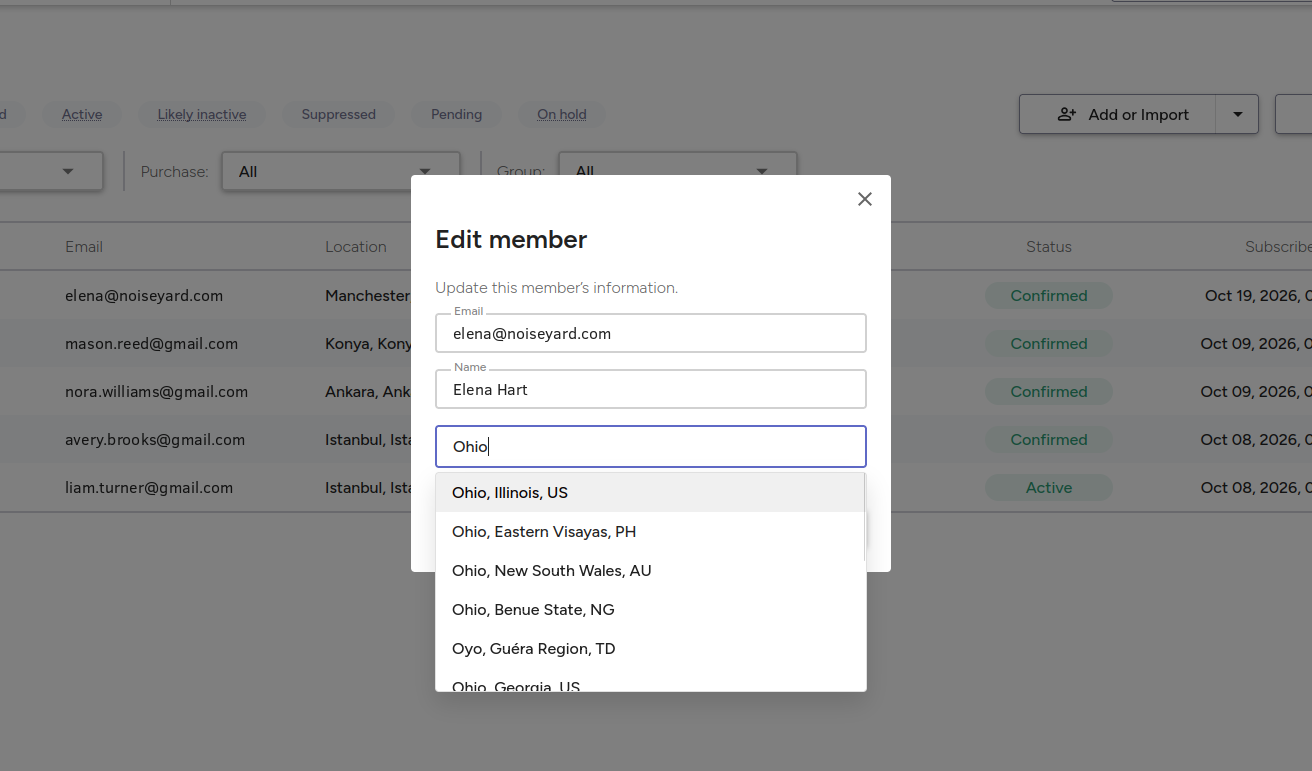
Keep fans with missing details on your list. They may live near your next show or have paid cash for a shirt at a gig.
Email-open reports can be incomplete too. Apple's Mail Privacy Protection can hide whether someone opened an email. Avoid using open reports alone to decide that a fan has lost interest.
What happens when you choose a group and a city?
Take a fictional band with 200 subscribers. Thirty have Manchester saved as their city, and 60 have bought merch through the band's website. Eight of the Manchester subscribers are also merch buyers.
Here are three emails the band could send:
| Announcement | Who to email | Recipients |
|---|---|---|
| Manchester show | Manchester | 30 |
| First look at a shirt | Merch buyers | 60 |
| Merch offer for Manchester fans | Merch buyers + Manchester | 8 |
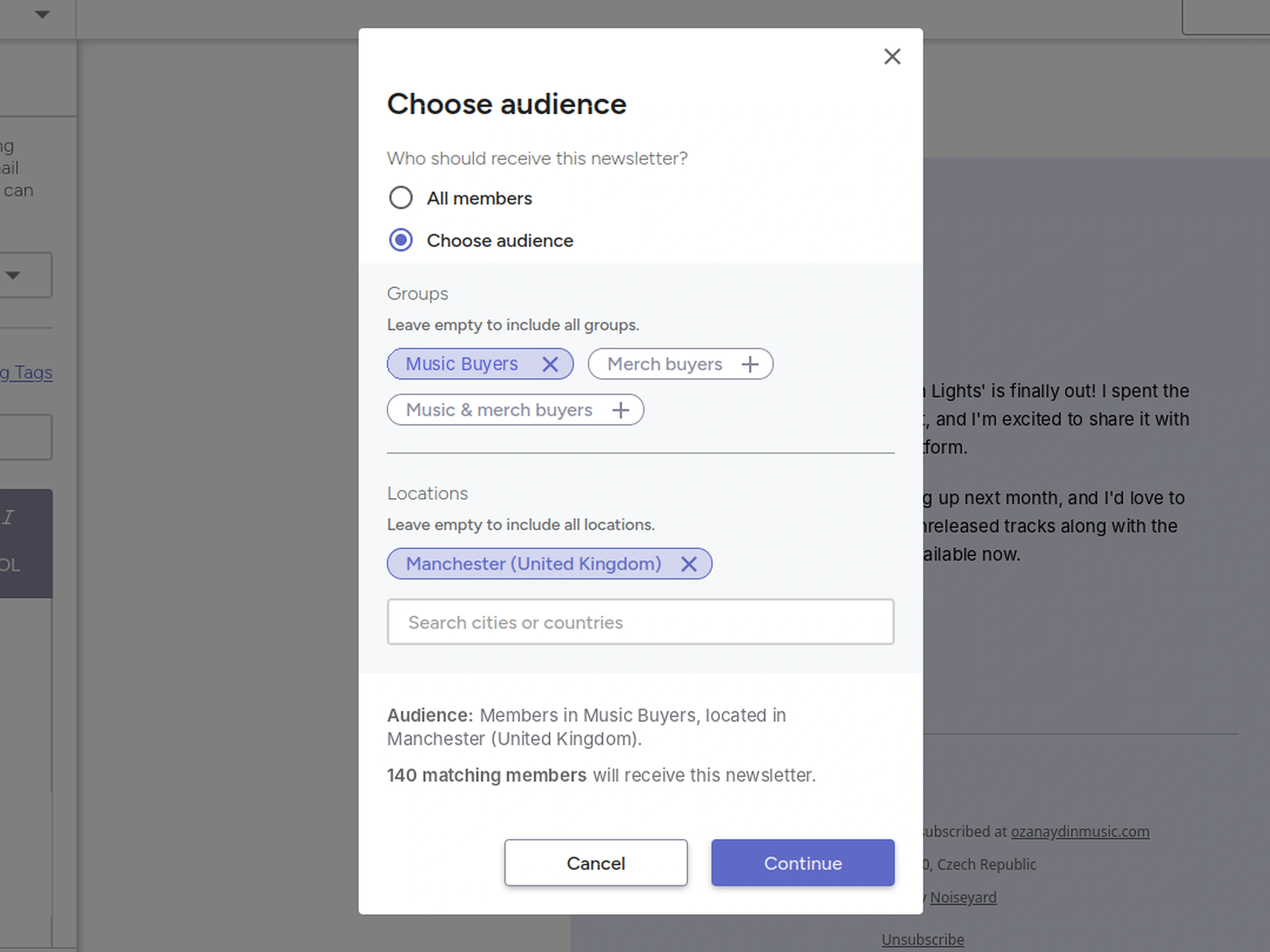
Choosing Merch buyers and Manchester sends the third email to those eight people. Each person must be a merch buyer and have Manchester saved as their city.
Choosing two buyer groups works differently in the controls pictured in this guide:
-
Selecting "Music buyers" and "Merch buyers" includes people who've bought either music or merch, including those who've bought both.
-
Selecting "Music & merch buyers" includes only people who've bought both.
Select groups together in one send when you want them to receive the same email. Sending separately to Music buyers and then Merch buyers could send the email twice to fans who've bought both.
Check who will receive your email
Before sending, read the audience summary and recipient count. For a Manchester show reminder, check the city. For an offer aimed at Manchester merch buyers, check that both the city and buyer group are selected.
Do this for every email, including when you reuse an old draft. A new draft may start with your whole list selected.
For scheduled emails, these controls use the latest group members and saved locations when the email goes out. Changing a group before that time can change who receives the message.
Check that the subject and message make sense for those readers. Open the link yourself and check that it goes to the right ticket or product page. For help writing the email, see the band newsletter examples.
Connect your website store and mailing list
Keeping your store and mailing list on the same website can save you from copying buyer details between services. You can use those orders to find customers who've signed up for your emails.
Noiseyard supports custom groups, automatic music and merch buyer groups from website orders, and city or country filters. The built-in mailing list page explains the signup and sending tools.
If you use separate services, check how purchase details reach your list. Make sure unsubscribed customers stay out of newsletter sends.
Build your own musician website
Music player, store, EPK, and mailing list, all built in. Start your 30-day free trial, cancel anytime.
Common mistakes to avoid
-
Creating groups you never use: make a group when you know what you'll send to it.
-
Assuming a city filter includes nearby places: choose each city you want to include.
-
Assuming every music buyer bought your latest album: check that album's orders first.
-
Sending the same email to each group separately: check whether some subscribers are in both groups.
-
Emailing every customer: choose the buyers who agreed to receive your newsletters.
Common questions
How many subscribers do I need before segmenting my list?
There's no minimum list size. Even a small list may include fans in several cities. You can select a city when you have a show to announce there.
Should every email go to a segment?
General release news can go to your whole list. Choose a smaller group when your email is about one city, a specific offer or an update a few fans have asked for.
Can one subscriber belong to several groups?
Yes. A fan might have bought music, bought a shirt and asked for vinyl updates. They can belong to all three groups. Check who will receive the email when you select several groups together.
Do I need a new website or email tool to do this?
Check your current email tool first. It may already let you select subscribers by city, purchases or groups. You can do this without a website. A website store helps when its orders are linked to your list. The email-tools comparison explains the options.
Will segmentation improve my sales or ticket numbers?
It can help you send an offer to people who may want it. Sales still depend on the music, product, date and price. The music marketing metrics guide explains how to review results after a campaign.
Final thoughts
For your next email, decide whether to send it to everyone or to a smaller group. Check the selected groups, cities and recipient count, then test the link before sending.