Photo by Rod Long on Unsplash


A booker opens 40 emails before lunch and replies to the ones that make a yes easy. That means one link, a clean page, and every booking question answered in under 30 seconds. That page is your electronic press kit, or EPK.
This guide walks through how to make an EPK step by step, for solo artists, bands, DJs, and producers. Follow the seven steps and you end up with a page you can send to promoters and press in place of a Google Drive folder. It gives you a real shot at a booking, a review, or a sync placement.
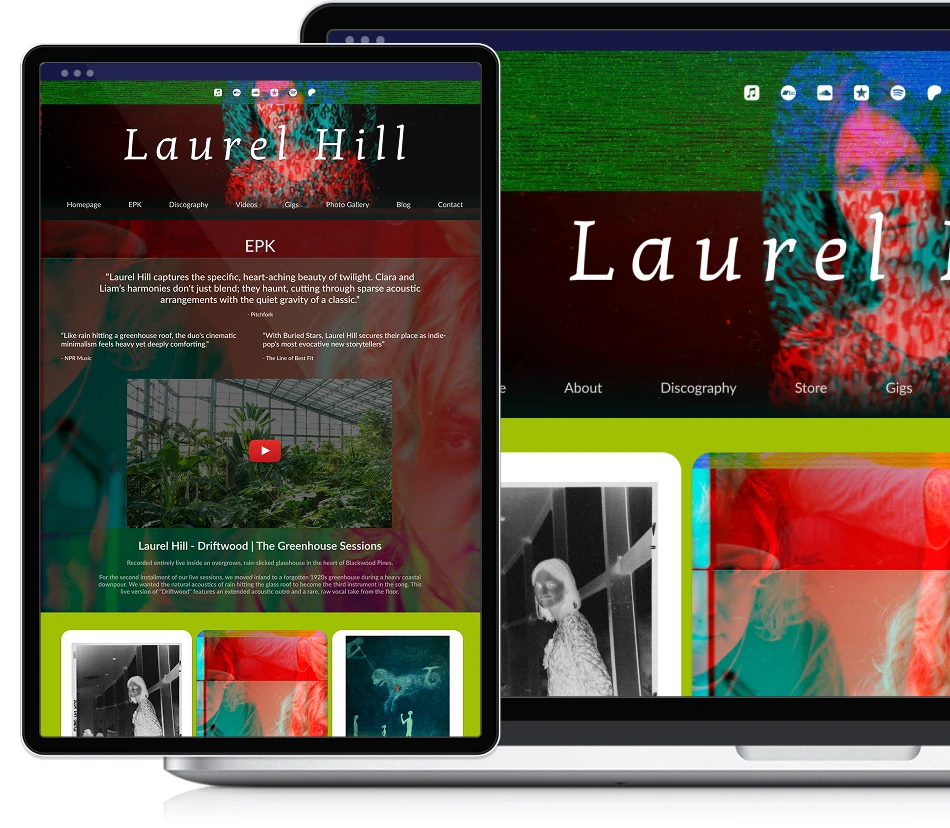
Your EPK is a one-link summary of who you are: bio, a featured release, press quotes, photos, and one contact route.
Host it as a page on your own website. Bookers click links, and they rarely download PDFs on a phone.
Write your bio in three lengths (one-liner, one paragraph, full version). Pitches almost always use the short ones.
Feature one release at a time and swap it each campaign cycle, so the page always leads with your current music.
Use 3 to 5 press photos in mixed aspect ratios, high resolution, and recent.
Give one primary contact route. Extra inboxes split the conversation and lose replies.
You make an EPK by putting six sections on one page: a header with your name, a short third-person bio, one featured release with a player, press quotes with credits, three to five high-resolution photos, and a clear contact route. Host it at a clean URL on your own website, then update it every release.
The steps below take each section from blank to done.
An EPK (electronic press kit) is a press-ready page about you. It answers the four questions a booker, promoter, journalist, or label A&R always asks: who is this artist, what do they sound like, what have other people said, and how do I reach them.
Answer all four in under a minute on one URL and you are ahead of the crowd. A useful EPK stays focused and scannable, gets updated when something changes, and lives on the same domain as the rest of your music presence. That way it reads as part of one real operation. Long origin stories, full photo dumps, and bare download links slow that reader down, so leave them out.
Six sections carry the page: a header with your name and a hero image, a bio, a featured release, press quotes, press photos, and a contact route. We break down each of the six, with examples and what to leave out, in What to Include in an EPK: 6 Sections Bookers Look For.
This guide is about the build. Each step below takes one of those sections from blank to publishable, in the order that makes the work easiest. You can add extras later (an upcoming-shows calendar, a video reel), but get the six basics up first.
Bookers and journalists read bios fast, so the first sentence carries most of the weight.
Write three lengths and keep them all on the page:
One-liner (under 25 words). For socials, press lists, and intro emails.
One paragraph (50-90 words). For blog roundups, festival programs, ticket pages.
Full bio (150-250 words). For the EPK itself and label pitches.
Write the full version in third person, present tense. Lead with a specific hook: your sound, your city, a result. End with what's currently happening, like a release, a tour, or a new project. In a band, name the lineup once and keep the story on the music.
A few rules of thumb:
Skip "passionate" and "emerging." They mean nothing.
Name a real reference point. "Indie pop with the warmth of mid-period Phoebe Bridgers" gives a reader somewhere to start. "Uncategorizable" gives them nothing.
Be exact about achievements. "10,000 streams on the lead single" says more than "growing fanbase."
If a sentence could open any bio, cut it.

For the full structure, see How to Write the Perfect Artist Bio. If you want the bio to rank for your name in search, there's a search-focused version in How to write an SEO-friendly artist bio.
Get our new guides by email
Putting your whole discography front and centre is a common EPK mistake. Bookers don't have time to choose from a catalog, so choose for them and lead with one release.
How to pick:
The release you most want to be known for right now.
Something with a moment that hooks in the first 30 seconds.
If you have a current campaign, that's the pick.
Embed the player from whichever service the booker is most likely to recognise (Spotify, Bandcamp, SoundCloud). Bandcamp tends to be the friendliest embed for press, because there's no preview-time limit and no ads.
Swap the featured release every campaign cycle. Treat it like the cover of a magazine: it should always show the current issue.
Press quotes do one thing on an EPK: they show you've been covered before. A booker won't read every word, but they'll scan the credit lines for an outlet they trust.
Where to pull from:
Reviews of past releases.
Show write-ups.
Local paper or radio coverage.
Podcast features.
Music blogs that ran your single.
Keep each quote to one or two sentences, the punchiest part, and credit the outlet and the writer. Specific wording earns more trust: "the kind of songwriting that sticks with you on the drive home" tells a booker something, and "a great new artist" tells them nothing.
If you have no quotes yet, leave the section out for now. A blank press section reads worse than no press section, and you can add it as coverage comes in.

Press works at last-minute notice, so make the photo grab easy:
Three to five images. More reads as clutter.
Mixed aspect ratios. At least one vertical (for socials), one horizontal (for blog headers and posters), one square (for thumbnails).
High resolution. Aim for 2,000 pixels on the long edge, so an editor can crop without losing quality.
Recent. If a photo shows a lineup or an era you no longer match, replace it.
A photo credit line under each image is a nice touch. It also keeps you out of trouble when a photographer sees their shot in print and wants attribution.
The biggest reason booking emails don't get sent is unclear contact info.
Pick one route and put it where bookers look first. Options:
Direct email. Use a dedicated address (booking@yourbandname.com) if you can. It signals that you're set up. If not, a clean Gmail is fine.
Contact form. Routes to the same place but feels lower-friction for a stranger. Useful if you want to capture fields like venue size, date, and genre fit.
Both, if you must. Show the email and offer the form as a fallback.

Include:
Your city, and whether you travel.
Genre and typical set length.
One line about technical needs (DJ rider, backline, etc.) if relevant.
Skip:
Manager contact for a project that doesn't yet have a manager.
Multiple email addresses with no clear primary.
Phone numbers, unless you want strangers calling you.
This decision quietly shapes how often your EPK gets opened. The options, ranked from worst to best:
A PDF attached to emails. Bookers rarely download attachments, especially on phones. Files get caught by spam filters, and the version goes stale the moment you send it.
A Google Drive folder. Better, because the booker can preview, but the URL looks suspect to an overworked inbox and the layout depends on the file types inside.
A page on your own musician website. A clean URL like yourname.com/epk that loads instantly, matches your branding, and leaves you one version to update.
If you're already on a music-focused builder, check for a built-in EPK page before you design one from scratch. Noiseyard includes an EPK page on every plan with the six core sections wired up by default, so you paste your copy and choose a release. If your current builder has nothing like that, How to Make a Music Website covers the broader setup. There's a comparison of the music-focused options in Best Website Builders for Musicians and Bands.

Once the EPK is published, three habits keep it useful:
Update it on release cycles. Every time you put out new music, swap the featured release, add any fresh press quotes, and replace the lead photo if you've shot new ones.
Watch what gets clicked. If your site shows visitor stats, check whether bookers open the link after you send it. No opens means the subject line needs work first. Opens followed by five-second exits mean the opening line of your bio is the first thing to rewrite.
Hide it from your main menu if you want it press-only. Some artists keep the EPK reachable only by direct link, so casual visitors don't see it but press can. A page-visibility toggle in your site editor handles this, and the URL keeps working for anyone you send it to.
You don't need to pay for a dedicated EPK builder. Two routes get you a presentable EPK for nothing:
A free page builder. A single page on a free site tool holds all six sections and gives you a link to send. The trade-off is the address. A long generic URL looks less professional in a pitch than yourname.com/epk, so move the EPK onto your own domain once there's budget for it.
A designed one-page PDF. Design tools offer free press kit templates, and the result looks clean. It carries the PDF problems from step 6 though: attachments go stale and phones don't open them. If you go this route, host the PDF at a link and send the link, never the file.
If you already pay for a musician website, check the plan before you spend anywhere else. Music-focused builders bundle the EPK page into the subscription, so building one adds nothing to the bill.
The real cost in an EPK is the photos, and a phone covers that too. Daylight, a plain background, a friend at arm's length, and a burst of options gets you press photos sharp enough to print. Shoot vertical and horizontal in the same session and you have the mixed ratios from step 4.

Too much. An EPK that takes 10 minutes to read won't get read.
An outdated featured release. A 2022 single front and centre, with a 2026 record out, tells press you don't update the page.
Buried contact. If a booker has to scroll twice to find your email, they'll close the tab.
A generic bio. "Inspired by everything from jazz to rock" tells a booker nothing.
Stock-looking press photos. Photos that could show any band give an editor nothing to print.
Multiple contact routes with no clear primary. Pick one and make the rest fallbacks.
No proof. One credible press quote or one notable show carries more weight than a wall of vague claims.
A page on your own website sidesteps the worst of these by default: one URL to keep current, contact visible without scrolling, and the featured release embedded at the top.
Build your own musician website
Music player, store, EPK, and mailing list, all built in. Start your 30-day free trial, cancel anytime.
Do I need an EPK if I already have a Spotify and Instagram?
Yes. Spotify shows your music and Instagram shows your personality. Bookers need a third page that answers booking questions on one URL: where you're based, who to contact, what you've done, and what you sound like in one sentence. The EPK is that page.
Should my EPK be a PDF or a webpage?
A webpage. Bookers rarely download files on phones, PDFs go stale the moment you send them, and a URL is easier to update and track. Save a PDF version for the outlets that ask for one.
How long should an EPK be?
Short enough to skim in under a minute, with your contact findable in three seconds. One focused page does the job. If yours runs longer, cut sections before you shorten sentences.
Should I include a contact form or just my email?
Either. A form filters inquiries (venue size, date, genre fit) and keeps your address off scraper lists. A direct email lets bookers reply inside existing threads. Showing the email with the form as a fallback covers both.
Can I have more than one EPK?
Keep two if your projects are different enough to be booked separately, like a band project and a solo DJ project. For one artist identity, keep one EPK and refresh it each release cycle.
What if I'm a brand-new artist with no press quotes yet?
Leave the press-quotes section out and lean on the bio and the featured release. Add quotes as coverage comes in. A clean four-section EPK reads better than six sections padded with weak quotes.
An EPK removes the friction that loses you bookings: the promoter who opened your email late at night, couldn't find a contact route, and closed the tab. Spend an afternoon getting the six sections right, update it every release, and send the link in place of an attachment.
Then put the page to work. Your EPK Is Ready. Now What? covers the pitch you send it with, and How to Get Gigs as a Musician walks through filling the calendar it points to.
Get our new guides by email.
Practical advice on promoting your music, getting gigs and selling online. You can unsubscribe at any time.
Marketing & Promotion
How to Promote Your Music Without a Label (10 Ways)